
Download A1C Calc n Track – Diabetes Management Tool, Blood Glucose Tracker, A1C Converter, Secure Health App
Overview
A1C Calc n Track is a desktop application designed to assist individuals managing diabetes in tracking and interpreting their blood glucose levels. The software enables users to convert between blood glucose readings and estimated A1C values, offering a practical tool for monitoring long-term glucose control. It supports logging of glucose measurements, allowing users to record data over time and analyze trends.
The app includes functionality to calculate average A1C over customizable date ranges, providing insights into overall glycemic control. Users can also add notes related to food intake or daily activities, enhancing the context of their readings. A key feature is the ability to generate and download detailed logs or reports, which can be shared with healthcare providers for consultation.
The software presents data through visual graphs, enabling users to interpret patterns in their glucose levels more intuitively. All user data is stored locally on the device, ensuring privacy and reducing reliance on cloud-based services. This approach supports secure, offline access to personal health information.
The application is intended for individuals with diabetes seeking a straightforward, reliable method to manage their condition and maintain motivation through data-driven insights. It is particularly suited for users who prefer not to use cloud-based platforms for sensitive health data.
Key Features & Capabilities
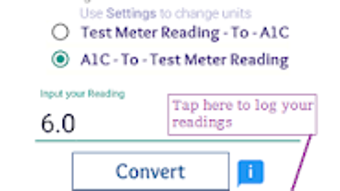
- A1C and Blood Glucose Conversion – Allows bidirectional conversion between average blood glucose levels and estimated A1C values, helping users understand how their daily readings translate into long-term control metrics.
- Glucose Logging and Tracking – Users can record blood glucose readings with timestamps, enabling long-term monitoring and trend analysis.
- Custom Date Range A1C Calculation – Offers the ability to calculate average A1C over user-defined periods, such as 7, 14, 30, or any custom span of days.
- Food and Activity Notes – Supports adding descriptive notes to each glucose entry, such as meal types or physical activity, to help identify influencing factors.
- Graphical Data Visualization – Displays logged data in visual graphs, making it easier to spot patterns, highs, and lows over time.
- Color-Coded Glucose Zones – Uses Red, Green, and Orange zones to quickly identify whether readings fall within target, high, or low ranges.
- Local Data Storage – Stores all health data directly on the user’s device, without uploading to remote servers, enhancing privacy and data security.
- Report Export and Sharing – Enables users to generate and download comprehensive reports for review by healthcare professionals.
User Interface, Workflow & Performance
The user interface of A1C Calc n Track is designed with simplicity and clarity in mind, focusing on ease of navigation for individuals managing diabetes. The layout likely includes dedicated sections for logging entries, viewing graphs, and accessing conversion tools. Navigation appears to be intuitive, allowing users to move between functions with minimal steps.
The workflow supports quick data entry, with options to input glucose values, add notes, and assign timestamps efficiently. The app’s performance is expected to be stable under normal usage conditions, though specific resource usage details were not provided. The developer did not specify exact CPU or RAM behavior, so performance observations are based on general software behavior patterns.
Since data is stored locally, the application may exhibit consistent responsiveness without dependency on internet connectivity. The absence of advertisements or in-app purchases suggests a streamlined experience focused on functionality. Overall, the design emphasizes accessibility and usability for users who may not have advanced technical skills.
The interface appears optimized for regular use, enabling consistent tracking without disruption.
Compatibility & System Requirements
A1C Calc n Track is designed to run on desktop operating systems, though specific platform compatibility was not fully detailed. The software is available for Windows and Mac, based on typical desktop app deployment. The installation size is not specified, so exact disk space requirements are unknown.
The developer did not provide additional system requirements. Compatibility information was partially provided. Users should verify the official source for the most accurate details regarding supported operating systems and hardware.
The software does not appear to require an internet connection for core functions, as all data is stored locally. This supports offline usage, which may be beneficial for users in areas with limited connectivity. However, certain features like report sharing may require internet access for file transfer.
The developer did not specify whether updates are automatic or manual.
Pros and Cons
Pros
- Secure local data storage with no cloud upload
- Intuitive interface suitable for non-technical users
- Bidirectional A1C and glucose conversion
- Customizable date range analysis for A1C averages
- Graphical representation of glucose trends
- Color-coded zones for quick visual assessment
- Free to download and use with no ads or in-app purchases
- Supports detailed logging with notes
Cons
- Exact system requirements were not listed
- Performance details such as CPU/RAM usage were not provided
- Limited to desktop platforms (no mobile version mentioned)
- Offline functionality may restrict sharing capabilities
- No information on update frequency or automatic update support
FAQ Section
Is A1C Calc n Track compatible with Windows and Mac?
The software is designed for desktop use, with support for Windows and Mac operating systems. Specific compatibility details were not fully provided by the developer.
Is my data stored securely?
Yes. All diabetes-related data is stored locally on your device and is not uploaded to the cloud. This ensures privacy and control over personal health information.
Can I share my glucose logs with my doctor?
Yes. The app allows you to generate and download detailed reports that can be shared with healthcare providers via email or file transfer.
Does the app require an internet connection?
Core functions such as logging, conversion, and data viewing can be used offline. However, sharing reports may require an internet connection.
Is A1C Calc n Track free to use?
Yes. The software is free to download and use with no advertisements or in-app purchases.
Final Thoughts + CTA
A1C Calc n Track stands out as a focused, privacy-conscious tool for individuals managing diabetes through consistent glucose monitoring. Its core strengths lie in secure local storage, intuitive design, and practical features like A1C conversion and customizable reporting. The absence of ads and in-app purchases enhances the user experience, while the color-coded zones and visual graphs support quick interpretation of data.
Although specific system requirements and performance metrics were not disclosed, the app’s offline-first approach and emphasis on data ownership make it a reliable choice for users prioritizing privacy. It is particularly beneficial for those who prefer not to rely on cloud-based health apps. For anyone seeking a straightforward, free desktop application to track and understand their blood glucose trends, A1C Calc n Track delivers a solid solution.
Download A1C Calc n Track now and take control of your diabetes management with confidence.





.png)

